


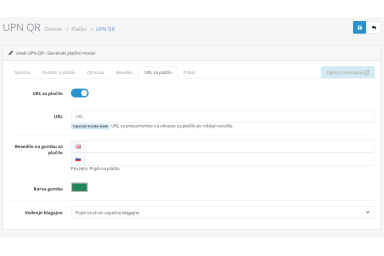


UPN QR: Slovenian Payment Extension
Generates a valid Slovenian UPN QR code at checkout
UPN QR is a payment extension for OpenCart 4 that enables customers to pay using the Slovenian UPN QR standard. The module automatically generates a compliant UPN QR code during checkout, allowing customers to complete bank transfers quickly and accurately using their mobile banking applications.
The extension is designed for businesses operating in Slovenia and supports all required UPN payment fields, including recipient details, IBAN, reference, amount, and payment purpose. By using a standardized QR code, the risk of manual entry errors is significantly reduced and the checkout experience is improved.
UPN QR integrates seamlessly with OpenCart 4, requires no third-party services, and works with all Slovenian banks that support UPN QR payments. The module is easy to configure, lightweight, and optimized for reliability and compatibility with modern OpenCart installations.
Key features:
- Generates a valid Slovenian UPN QR code at checkout
- Sending UPN QR to email and displaying in your personal account
- Quickly copying payment details
- Generating a custom payment link
- Fully compatible with OpenCart 4
- Supports official UPN payment format and references
- No external APIs or subscriptions required
- Improves accuracy of bank transfer payments
- Simple installation and configuration
This extension is ideal for merchants who want to offer a trusted local payment method and streamline bank transfer payments for Slovenian customers.
Localization: Slovenian, English.
Installation instructions for "UPN QR"
1. Download the extension archive: upnqr.ocmod.zip.
2. In the admin panel, go to Extensions > Installer and upload the archive. Press install button.
3. Go to Extensions > Extensions and choose the extension type "Payments".
4. Find and enable the "UPN QR" module. Edit this module, enable the status switcher, and save changes.
5. Check for a new payment method on the order form
Related extensions
Bank Transfer Advanced
Custom payment method with configurable details, payment link, QR code, and even a custom invoice...

Google Shopping
Generates XML feeds for Google Merchant Center and includes a wide range of filters and settings...
Improved Image Manager
Allows you to add multiple product images at once and sort them within the product. The file manager..
Invoice Extension
This extension adds automatic invoice generation to your store...